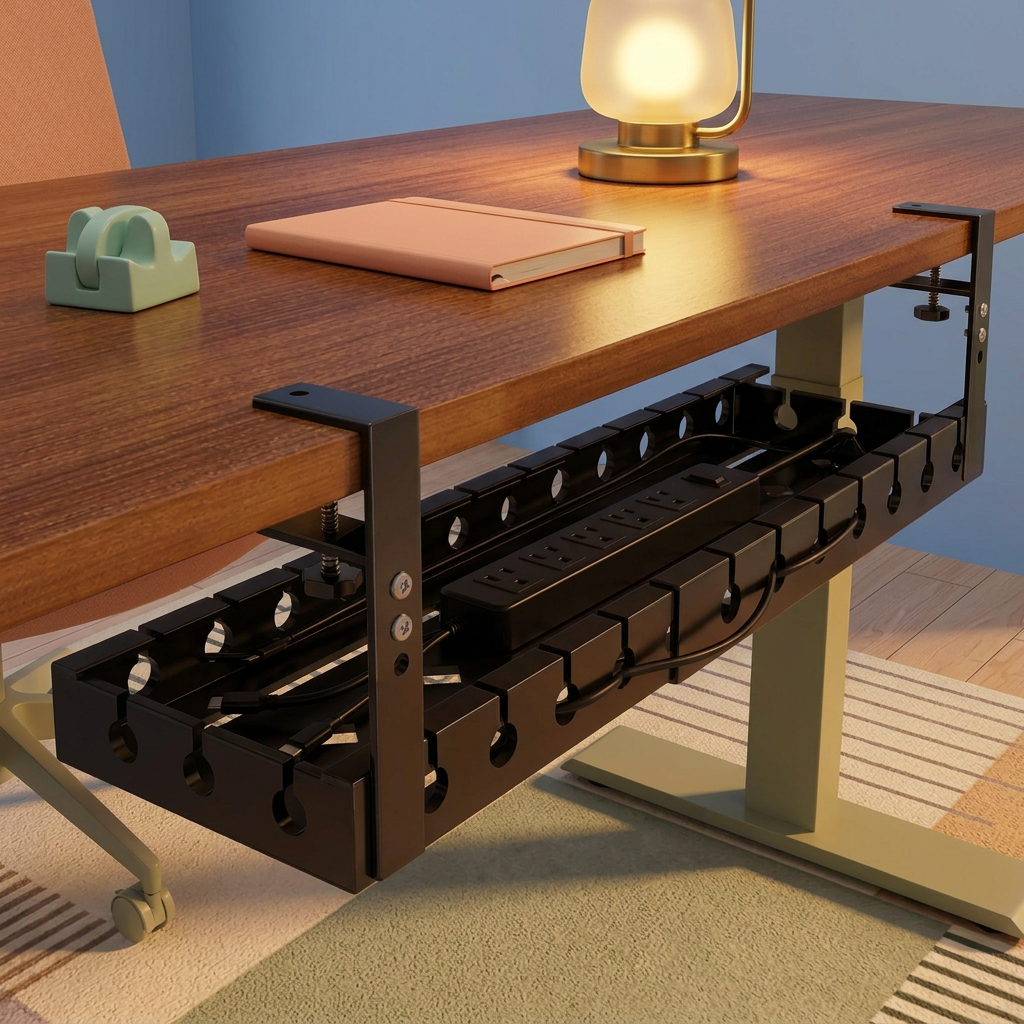
Black Under-Desk Cable Management Tray with Dual Desk-Edge Clamps & Open Routing Slots for a More Organized Office Setup
Black Under-Desk Cable Management Tray with Dual Desk-Edge Clamps & Open Routing Slots for a More Organized Office Setup
Couldn't load pickup availability

Black Under-Desk Cable Management Tray with Dual Desk-Edge Clamps & Open Routing Slots for a More Organized Office Setup
🕸️ Your Cables Need a Route, Not Another Pile.
Follow the cables behind a typical desk and a familiar picture appears. One lead runs down from the monitor. Another comes from the laptop charger. A power strip occupies a place on the floor because there was never a better plan for it. The desktop may look considered, while the space beneath tells a different story.
This black under-desk cable management tray creates a designated area for suitable cables and accessories below the work surface. Its elongated open-top form provides a place to arrange the collection, while repeated openings along the sides offer points to guide compatible cables into and out of the tray. Two upright brackets connect the tray to the pictured desk-edge clamp design.
The goal is not to make every wire disappear. It is to replace an accidental arrangement with one you can understand, inspect and adjust as your setup changes.
🔎 Read the Design From the Outside In
First, the desk-edge connection
The reference design shows two C-shaped clamp assemblies positioned around the edge of a desktop. An upper tab sits above the work surface, while a screw-operated contact point approaches the underside. Upright supports extend down toward the tray, with visible fasteners connecting the assembly.
This is a specific mounting arrangement, not a universal fit promise. Tabletop thickness, edge shape, material and underside obstructions all matter. Confirm the actual clamp opening and installation requirements before choosing a position.
Next, the repeated side openings
The long side walls feature open-edge notches ending in rounded openings. Their repetition gives the tray a distinctive outline and provides potential routing positions along its length. Rather than directing every lead through one end, you can plan exits around the locations of your devices, provided the cable size and connector arrangement are compatible.
Finally, the open interior
The rectangular tray has raised sides and visible slots in its base. There is no enclosed lid or built-in drawer in the pictured design. That open format lets you see how the contents are arranged instead of hiding an overfilled bundle inside a closed box. The tray remains an organizational accessory; the openings do not establish a tested cooling, electrical-protection or fire-resistance function.
🛤️ Plan the Journey: Device, Tray, Outlet
A more useful cable layout starts with the destination of each lead. Think about the devices above the desk, the accessories you intend to place in the tray and the outlet supplying the setup. These three positions determine where cables need to travel and where a little extra length is necessary.
From the device: identify which lead belongs to which item before rearranging anything. A clear route from a monitor or charger is easier to maintain than several unmarked wires crossing one another.
Through the tray area: group suitable accessories without stacking them into an inaccessible pile. Keep controls and connection points reachable. Leave room around equipment according to its manufacturer's instructions, and avoid tight bends or strain where a cable crosses an opening.
Toward the outlet: remember that a supply cable may still need to descend to the wall. An organized setup does not mean every remaining lead should be pulled taut. Allow an appropriate route without pinching the cord or placing it where desk or chair movement will catch it.
🧱 Give the Desk Underside the Same Attention as the Desktop
The best location is the one that fits the desk and the way you use it. Check for an apron, support rail, monitor-arm clamp, existing drawer, cable tray or moving desk mechanism. Two accessories that look compatible in separate photographs can still compete for the same small area beneath a tabletop.
- Check the edge: confirm that its thickness, profile and material are suitable for the actual clamp design.
- Check the tray space: verify overall measurements and the clear area required for the supports.
- Check your contents: measure the intended power strip or accessory, including the space occupied by plugs and cable exits.
- Check your posture: leave comfortable room for knees, chair arms and normal movement.
- Check access: keep switches and plugs reachable rather than placing them behind an arrangement you cannot easily inspect.
Follow the supplied mounting instructions and load limits. A clamp-style appearance does not by itself establish that installation is tool-free, will leave every surface unmarked or is suitable for glass, hollow or delicate desktops.
🖥️ For the Setup You Use Today, and the Changes That Come Next
A laptop-based workstation might have only a charger and a few accessory leads. A larger arrangement may add a monitor, speakers or other equipment. The tray gives compatible items a shared area, but the sensible contents depend on verified dimensions and load capacity rather than the number of devices in a styled photograph.
Leave room for ordinary changes. You may need to replace a charger, unplug a device or trace a connection later. A loose, understandable arrangement is often more useful than a tightly packed bundle that looks tidy for one photo but becomes difficult to maintain.
If you use a height-adjustable desk, check the complete movement path before finalizing the cable route. Allow suitable slack for the desk's travel and keep leads away from moving mechanisms. Do not assume the tray makes a standing-desk setup compatible without checking the actual installation.
🧹 A Clearer Floor Area Starts With a Better Place Above It
Where compatible equipment can be moved into the tray, fewer accessories need to rest directly on the floor. That can make the space beneath a desk look more deliberate and leave a simpler area to work around during routine cleaning.
The tray is not a guarantee that every cable will stay off the floor. Outlet position, cable lengths and the equipment you use still determine the final arrangement. Think of it as a defined starting point: a place for suitable items to belong, rather than a promise that the entire setup will become wireless.
🎛️ A Dark Foundation for a Colorful Workspace
The black finish provides a restrained visual anchor beneath a wood-toned desktop. It works with cream furniture and sage accents, while peach notebooks and lavender desk mats can carry the softer colors above the surface. The organizer stays visually consistent even when your stationery changes.
For an evening workspace, pair powder blue with a warm yellow lamp and a small mint accessory. The contrast gives the room character without turning the cable-storage area into a decorative distraction. A quieter charcoal-and-wood palette works equally well if you prefer the organization to blend into the background.
📝 Before It Becomes Part of Your Setup
Is a power strip included?
This listing is for the cable management tray. Power strips, leads, electronics and decorative items shown in styled images illustrate possible arrangements and are not an included electrical-accessory bundle.
Does the tray provide charging or surge protection?
No electrical function is established for the tray itself. It is a storage and organization accessory, not a charger, power distribution device or protective electrical product.
Will it fit every desk?
No universal compatibility is claimed. Confirm the clamp range, desk material, edge profile, underside clearance and product measurements before ordering.
How much can it hold?
The reference image does not establish a load rating or a maximum number of devices. Obtain the manufacturer's specifications and stay within the approved limits.
Can I fill it with spare cable loops?
Arrange cables according to the guidance for the cables and equipment you use. Avoid tight coils, pinched leads, obstructed ventilation and crowded equipment. Disconnect power before rearranging electrical accessories, and never use the tray as a substitute for appropriate electrical precautions.
🪁 Let the Workstation Feel Finished From More Than One Angle
The top of your desk is only part of the workspace. Beneath it is another set of choices: where cables travel, where accessories rest and how easily you can reach them when something changes.
With its open tray, repeated side-routing points and dual desk-edge clamp design, this organizer gives those choices a clearer structure. Plan the fit, select suitable contents and build a cable arrangement that makes sense long after the first tidy-up.