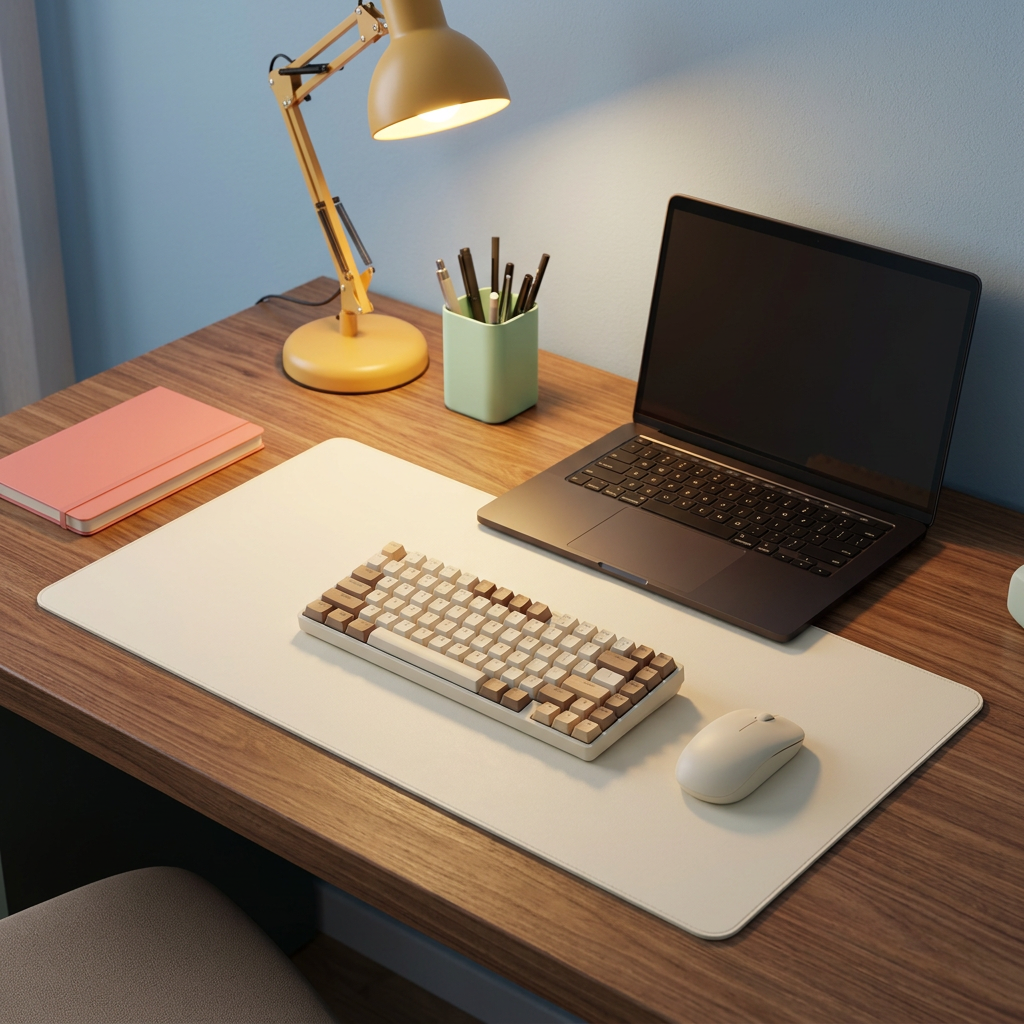
Cream Rounded-Corner Desk Mat for Laptop, Keyboard & Mouse Setups, a Neutral Desktop Pad for Home Office and Study Spaces
Cream Rounded-Corner Desk Mat for Laptop, Keyboard & Mouse Setups, a Neutral Desktop Pad for Home Office and Study Spaces
Couldn't load pickup availability

Cream Rounded-Corner Desk Mat for Laptop, Keyboard & Mouse Setups, a Neutral Desktop Pad for Home Office and Study Spaces
🖼️ Start With the Background. Change the Whole Composition.
Before you add another desk accessory, look at the surface beneath the ones you already own. A keyboard, mouse, notebook and pair of earbuds can feel like unrelated objects when each sits in a different patch of desktop. Give them a shared visual background and the arrangement begins to make more sense.
This cream desk mat introduces that background without asking for attention of its own. An elongated rectangular shape, softly rounded corners and a plain light-colored top create a defined area within the larger desk. The warm neutral tone contrasts gently with wood and makes darker equipment stand out, while colorful stationery can remain part of the scene.
It is a desk mat placed beneath equipment and everyday accessories, not a keyboard skin fitted over individual keys. Its appeal begins with the way it frames your workspace: simple, unprinted and ready to be arranged around the routine you actually have.
📏 A Layout Proposal, Not a One-Size-Fits-All Promise
Think of the mat as the boundary of a small composition. You decide what belongs inside it, what stays outside and where a little open space matters. A full-size keyboard and a compact keyboard can leave very different amounts of room for a mouse, so begin with measurements rather than a styled photograph.
Confirm the product's actual length, depth and thickness before ordering. Then compare them with your desktop and the equipment you plan to place on it. The reference image does not provide verified dimensions, and the proportions shown in generated styling images should not be used as a measuring guide.
- Measure the active area: include the keyboard, mouse movement space and any notebook you regularly use.
- Check front-to-back room: consider your normal hand position, cable exits and the depth of the desk.
- Leave practical margins: avoid choosing a layout that only works when every object touches the next.
- Look beyond the mat: make room for monitor bases, desk supports and accessories that may need their own stable position.
A good arrangement should work during a busy afternoon, not only when the desk has been carefully staged.
🤍 What the Quiet Details Add
A warm cream field
The pictured surface is light and plain, with no decorative graphic or printed logo. That creates a consistent visual field beneath objects with very different shapes. A black keyboard becomes a clear focal point. A pale notebook blends more softly into the composition. A small colored accessory can provide the accent without competing with a busy background.
Rounded corners
The curved corners soften the outline against the straighter lines of a keyboard, screen or desk edge. Viewed from above, the shape reads as one continuous area rather than a collection of small separate pads. The edge remains visually restrained instead of turning into a decorative border.
An understated profile
The reference shows a low-profile mat laid across the desktop. Exact thickness, edge construction, backing and material composition are not established by the image. Choose the appearance shown, but confirm any specific construction requirement before relying on it.
⌨️ Proposal One: Give the Keyboard and Mouse a Shared Zone
Place the keyboard where it fits your working position, then allow a separate area for the mouse rather than squeezing it into the remaining corner. The cream background makes the relationship between these two everyday tools easy to see. A black keyboard and mouse create a crisp contrast; lighter equipment produces a quieter, more tonal effect.
The mat is shown as a shared surface in the photography, but mouse behavior depends on the actual surface and the device being used. No tracking-speed, gaming-precision or sensor-compatibility result is established by the reference image. If a particular mouse performance is essential, check the verified product specifications first.
📔 Proposal Two: Make Room for the Page Beside the Screen
Some tasks begin on a screen and make more sense on paper. A weekly plan, a quick sketch or a short list of priorities can deserve a place beside the keyboard, not beneath it. A suitably sized mat can help define the area where those tools meet, with a notebook on one side and the active input devices nearby.
Try leaving an open section rather than covering every part of the mat with permanent objects. That space can become the temporary home of the task in front of you. When the task changes, the arrangement can change without moving the whole desk setup.
Writing feel depends on the actual mat construction, the paper and the writing tool. The photographs do not establish cushioning, hardness or suitability for every pen. Confirm those details if direct writing on a particular surface is important to you.
🧑💻 Proposal Three: Bring the Laptop Into the Arrangement
For a laptop-led workspace, compare the device's footprint with the confirmed mat dimensions and the rest of your equipment. Some layouts place the laptop partly within the mat area; others keep the laptop farther back and use the mat mainly for the separate keyboard and mouse.
Neither approach needs to imitate the photography exactly. Choose a configuration that leaves cable connections accessible, allows the equipment to sit appropriately and follows the device manufacturer's guidance. Do not assume that a desk mat provides cooling, heat resistance or protection from operating temperatures.
🧡 Let the Accessories Carry the Color
Peach, sage and lavender: a peach notebook and lavender pen provide small accents, while a sage wall or organizer introduces a calmer background. The cream mat connects those colors without becoming another competing shade.
Powder blue and butter yellow: pair a blue backdrop with a warm yellow lamp for an evening desk. Mint stationery can add a smaller secondary note. Keep the mat cream so that the lighting and accessories do the expressive work.
Black, cream and warm wood: if you prefer a simpler palette, let the keyboard and mouse create the contrast. A wood desktop supplies texture around the mat, while the unprinted center keeps the arrangement visually clear.
These combinations do not require a matching set of new accessories. Start with a few pieces you enjoy using and let the neutral background make them feel more connected.
🕰️ The Desk Between Tasks
Morning begins with a keyboard and a short list. Later, a notebook moves into the active area while you work through an idea. By evening, the page is closed and the loose stationery can return to its own place. The mat stays as the consistent outline through those changes.
That is a useful way to approach the product: not as something that organizes the desk for you, but as a visible area you can reset. Put back the items that belong there, remove the things that have only arrived temporarily, and leave enough room for the next task.
🧴 Know the Surface Before You Choose Its Care Routine
The reference photograph does not confirm leather, faux leather, fabric, rubber or another specific material. It also does not establish waterproofing, stain resistance, a non-slip backing or a tested protective function. None of those properties should be inferred from the plain cream appearance.
Follow the care instructions for the actual supplied product. Do not assume the mat is machine-washable, suitable for soaking or compatible with a particular cleaner. Keep liquids away from electronics, and avoid using the mat as a hot pad or cutting surface unless those uses are specifically supported by the manufacturer.
🛒 Before You Make It Part of Your Desk
What is the product?
A cream desktop mat with a rounded rectangular outline, intended as a surface beneath a thoughtfully arranged selection of desk equipment and accessories. It is not an individual-key keyboard cover.
What is included?
The listing is for one desk mat. Keyboards, mice, laptops, screens, notebooks, lighting and decorative objects shown in the styled images are presentation props.
Will it fit my setup?
Compare verified mat dimensions with your desk and the actual equipment you use. Photography illustrates layout ideas, not universal fit.
Does it protect against every mark or spill?
No such guarantee is established by the reference. Confirm the actual material and supported protective properties before choosing it for a specific performance requirement.
🌼 A Simple Frame for the Way You Work
You do not always need more objects to make a desk feel more considered. Sometimes you need a quieter background, a clearer boundary and a little room between the things already there.
With its warm cream appearance and rounded outline, this mat gives you a neutral starting point. Check the dimensions and construction, choose your layout, and let the details around it make the workspace your own.