Dual-Slot Vertical Laptop Stand with Graphite-Gray Finish & Rounded Base for Organized Closed-Laptop Storage
Dual-Slot Vertical Laptop Stand with Graphite-Gray Finish & Rounded Base for Organized Closed-Laptop Storage
Couldn't load pickup availability

Dual-Slot Vertical Laptop Stand with Graphite-Gray Finish & Rounded Base for Organized Closed-Laptop Storage
💻 Close the Laptop. Open Up Your Workspace.
Your laptop does not need to lie across your desk when you are not using its screen.
A closed laptop can still occupy the space where you want to write, sketch or lay out tomorrow's work. Add a second device and the desk can quickly become a collection of overlapping rectangles. This dual-slot vertical laptop stand offers a different arrangement: store compatible closed devices upright in two defined channels, rather than letting them spread across your working surface.
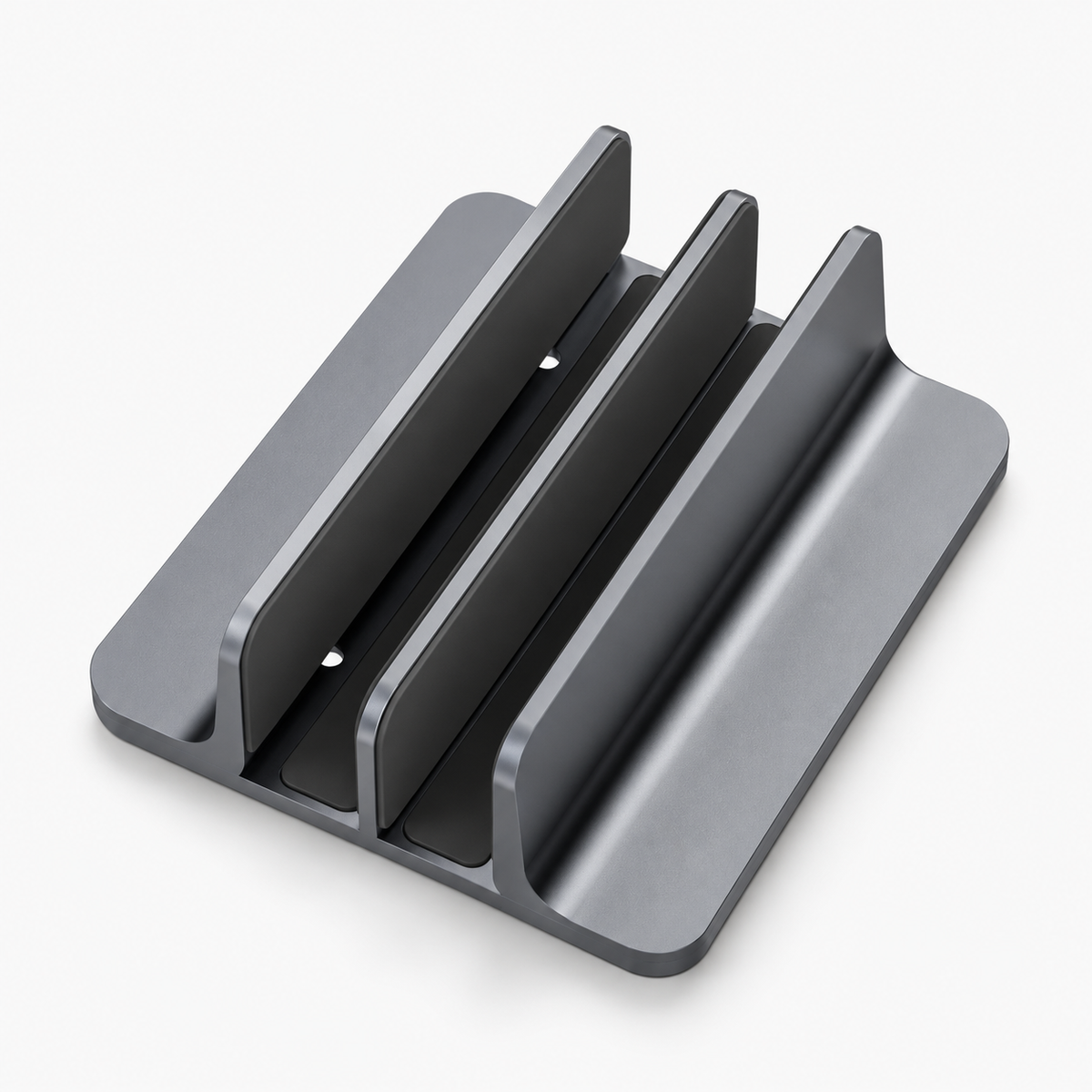
The pictured design pairs a graphite-gray appearance with three parallel upright dividers and a low rectangular base. Rounded base corners soften the outline, while the long channels give the stand a clean architectural rhythm. It is a purposeful place to park your equipment, with a restrained look that works alongside the technology already on your desk.
🧱 A Desk Layout Built Around What You Do Next
When the laptop lies flat: its closed lid occupies a broad patch of your desk, often becoming a temporary landing place for papers and other objects.
When a compatible laptop stands vertically: its storage orientation changes, leaving a different footprint and creating a clearer separation between stored equipment and the area where your hands work.
The benefit is not a larger desk. It is a more deliberate use of the desk you have. You can reserve one area for devices and another for a notebook, keyboard or project materials, without treating the closed laptop as a surface to stack things on.
Choose the stand's position with care. An upright device needs clearance above and around it, and you should still be able to lift it out without reaching awkwardly across a monitor or cable bundle.
♟️ Three Dividers. Two Channels. One Clear Storage Zone.
A dedicated channel on each side of the center divider
The photo shows three raised parallel walls, forming two separate slots. This layout provides distinct parking positions for compatible devices rather than one shared opening. If you keep separate personal and work laptops, the two-channel format gives you a way to organize them side by side, provided both fit and the loaded arrangement is stable.
The middle divider visually separates the channels. Before placing two devices together, check their thickness, height and weight against the actual product specifications. Two slots describe the layout; they are not a guarantee that any two computers can be supported safely.
A base that extends beyond the dividers
The base projects outward on either side of the upright walls, creating a broad-looking foundation beneath the channels. Its rounded corners make the outline feel less severe than a sharp-edged block, while the low profile keeps attention on the vertical lines above.
Dark inner channels with a restrained exterior
The inside of each channel appears darker than the outer gray surfaces. That contrast adds depth to the design and makes the two storage positions easy to distinguish in the photo. Exact lining material is not specified, so no particular cushioning or scratch-protection performance is claimed.
Simple geometry instead of visual clutter
There are no large decorative panels or tall surrounding cages in the pictured design. The stand's identity comes from repetition: long walls, parallel channels and a rounded rectangle below. It is an accessory for people who prefer organization to look quiet rather than complicated.
🌿 Give Each Device a Role, Not Just a Place
The work-and-personal arrangement. Assign one channel to your work laptop and the other to a personal device, if both are compatible. A consistent left-and-right routine makes it easier to return each computer to the same position at the end of a session.
The single-device arrangement. You do not have to fill both channels. Store one compatible laptop and let the stand define a clear equipment zone. Empty space can be part of a useful layout, not something that needs another object.
The end-of-day arrangement. When the computer is shut down and ready to store, place it in its designated channel and clear away the papers that gathered during the day. The stand becomes a small visual cue that the workspace is being reset.
In every arrangement, fit comes first. A slot should not require you to force a device between the dividers, and a loose fit should not be mistaken for secure support.
🪄 The Small Reset That Changes Tomorrow's First Glance
You finish your last task and close the laptop. Instead of leaving it in the middle of the desk with a notebook on top, you give it a defined place beside the monitor. The notebook goes where you will use it tomorrow. The keyboard stays within reach. The center of the desk is no longer a temporary storage pile.
Nothing dramatic has happened. You have not replaced the furniture or redesigned the room. You have simply made one decision repeatable: this is where the laptop belongs when it is put away.
A tidier desk is easier to maintain when returning an item takes less thought than finding a new place for it.
The vertical stand gives that habit a physical form. Its graphite-gray appearance keeps the effect subtle, so the arrangement can feel composed without becoming overly styled.
🧵 Make the Setup Feel Connected, Not Crowded
The stand can sit visually alongside a silver monitor arm, a dark keyboard, a pale desktop or warm wood tones. Its neutral gray appearance bridges those combinations without asking you to match every accessory perfectly.
Think about the routes around it as well as the objects beside it. Leave room for your hand to reach the laptop. Avoid positions where a cable could tug on the device or where a passing sleeve could catch an exposed corner. Keep the loaded stand away from the desk edge and away from spills.
If you plan to use a laptop with its lid closed and an external display, confirm that the computer manufacturer permits that operating position and follow its ventilation, power and peripheral requirements. The stand is an organizer, not an electronic dock, charger or cooling system.
🧰 Your Fit-First Checklist
- Measure device thickness. Include any fitted shell or cover, and compare the result with the actual usable slot width.
- Confirm the slot configuration. The image shows two channels, but does not establish whether their width can be adjusted.
- Check weight and height suitability. Confirm the stand's load rating and device compatibility before storing one or two laptops upright.
- Choose an appropriate contact edge. Avoid placing pressure on ports, buttons, protruding parts or vulnerable corners. Follow your device manufacturer's guidance.
- Place and test carefully. Set the stand on a clean, level surface, support the device during insertion and confirm stability before releasing it.
- Keep access clear. Leave space to remove each laptop without colliding with surrounding equipment.
🗝️ The Details Behind a Confident Choice
Is it a laptop riser for typing?
No. This is a vertical storage format for compatible closed laptops, not an angled platform for using an open laptop keyboard.
Will every laptop fit?
Compatibility is not universal. Device thickness, case shape, weight and contact points matter. The photo does not provide slot dimensions or a maximum load rating.
Are the channels adjustable?
An adjustment mechanism is not confirmed by the supplied image. Do not assume variable slot width unless the product specifications establish it.
Is it made from aluminum or lined with silicone?
The pictured finish has a gray metallic appearance, but exact body and lining materials are not provided. This description does not claim a particular metal, silicone padding or certified scratch resistance.
Does it include charging or cooling features?
No electronic connection or active cooling system is shown. Choose it for device organization, not for charging, docking or a guaranteed temperature improvement.
Can both channels be used at once?
The dual-slot design offers two storage positions. Simultaneous use depends on verified device fit, total supported weight and balance. Check those details before loading both.
🏁 Put Your Laptop Away Without Putting Your Workspace on Hold
A closed computer can have a place of its own. So can your notebook, your keyboard and the next project you are ready to begin.
With two parallel storage channels, a graphite-gray appearance and a rounded rectangular base, this vertical laptop stand brings a clear visual structure to everyday device storage. Choose a compatible fit, establish your own routine and let the space around your equipment work harder for you.
Park vertically. Arrange intentionally. Make room for what comes next.