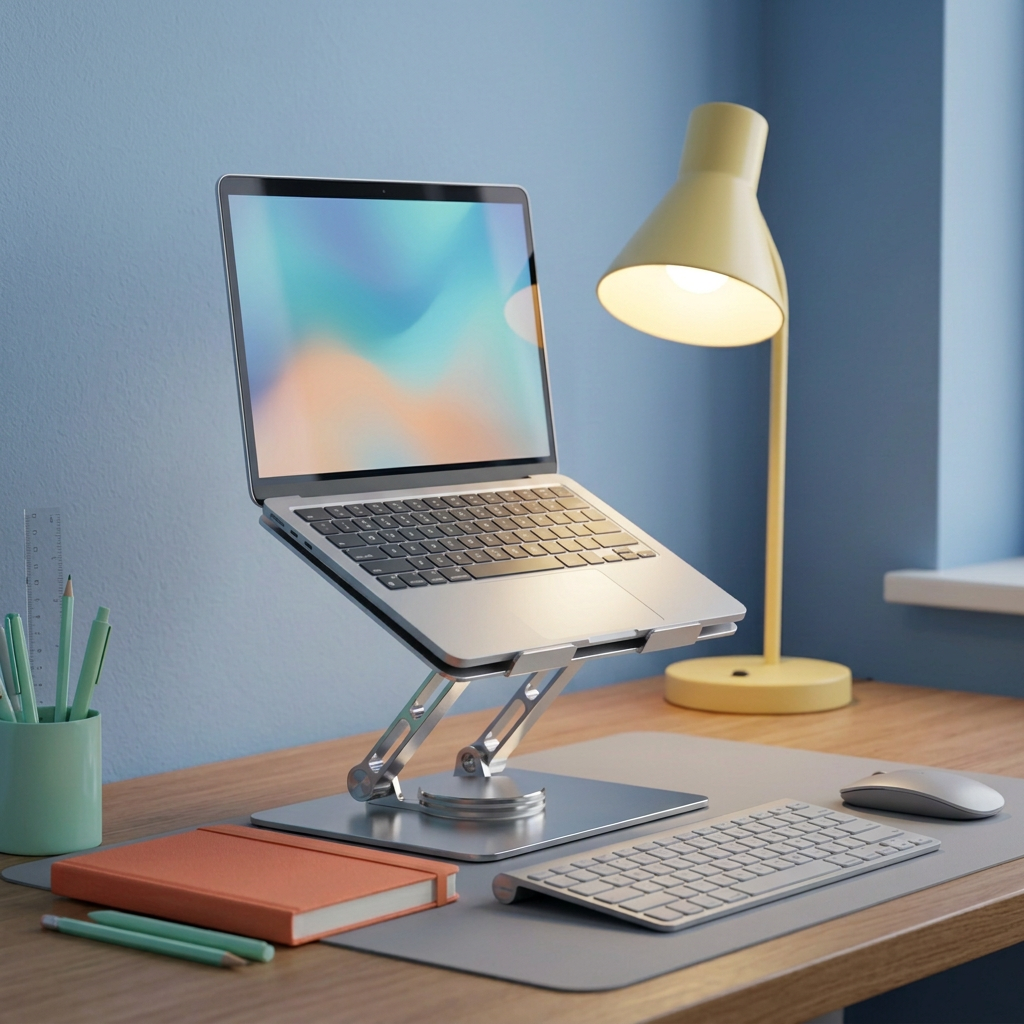
Silver Desktop Laptop Stand with Slotted Support Platform, Gray Contact Pads & Dual-Arm Design for a Considered Home Office Setup
Silver Desktop Laptop Stand with Slotted Support Platform, Gray Contact Pads & Dual-Arm Design for a Considered Home Office Setup
Couldn't load pickup availability

Silver Desktop Laptop Stand with Slotted Support Platform, Gray Contact Pads & Dual-Arm Design for a Considered Home Office Setup
🪞 A Different Place for Your Laptop. A Fresh Perspective on Your Desk.
A laptop can go almost anywhere. A desk you enjoy returning to takes a little more intention. The screen, keyboard, notebook and mouse all need a place that makes sense together, rather than competing for the same patch of tabletop.
This silver desktop laptop stand introduces a dedicated platform above the work surface. Its slotted top, gray contact pads and two front retaining lips give the support area a clearly defined shape. Below, a pair of articulated-looking arms connects to a circular lower joint and a broad rectangular base, creating an architectural profile that remains attractive even when the laptop is away.
Think of it as a starting point for a more considered arrangement: the laptop on its platform, a separate keyboard and mouse in the working area, and room to decide where the rest of your everyday tools belong.
🪜 One Workspace, Three Distinct Layers
The viewing layer
The stand places a compatible laptop on a raised, tilted platform instead of directly on the desktop. That changes the relationship between the screen and the objects around it. The right position for you depends on the actual stand settings, your chair, your desk and the way you work. There is no single pictured height that can suit every person or setup.
The input layer
A separate keyboard and mouse let you plan their positions independently of the laptop platform. You can keep the keyboard in front of you and leave the mouse in its own area, rather than arranging everything around the laptop's built-in input surface. These accessories are shown as styling examples and are not included with the stand.
The everyday layer
A notebook, pen or small collection of stationery can then have a deliberate position beside the working area. The stand still occupies a real footprint on the desk, so think about the whole layout rather than assuming the space beneath it becomes unrestricted storage. The broad base needs a flat, unobstructed surface.
🧩 The Visible Details, Explained Without the Guesswork
A rounded rectangular platform. The upper plate has a wide rectangular opening near its top and a series of diagonal slots through the center. Together, these openings create a lighter visual pattern than a completely solid plate and give the silver surface its distinctive identity.
Gray contact areas. Two long gray strips run near the sides, with a horizontal gray pad toward the lower part of the platform. These are visible features of the reference design. Their precise material and tested grip performance are not established by the photograph, so they should not be treated as a guarantee against every type of movement or surface marking.
Two front retaining lips. Short raised tabs sit along the lower edge of the platform. They define the front of the support area and should be considered when checking your laptop's thickness, front-edge shape and fit. A device must sit correctly on the platform, not balance on a corner or bridge an incompatible shape.
A paired support structure. The silver arms have visible joints and openings, giving the profile more detail than a single solid column. The lower circular connection sits above a rectangular silver base. These visible parts describe the design; they do not establish a particular rotation range, height range or load rating.
🌬️ An Open Pattern Is a Design Feature, Not a Temperature Promise
The wide cutout and diagonal slots leave sections of the support platform open. That is an observable feature of the stand, but the photograph alone does not prove a cooling result or a specific temperature reduction. There is no fan or powered cooling function shown.
Before placing your laptop, check where its intake and exhaust openings sit and follow the device manufacturer's guidance. Keep required ventilation areas unobstructed. Laptop construction, workload and room conditions differ, so an open-pattern stand should not be treated as a substitute for the operating instructions of your own device.
🎬 A Workday in Three Small Scenes
The first task. The curtains are open, the notebook is still closed, and your laptop has its place above the desk. You set the separate keyboard in front of you, bring the mouse closer and choose the first thing to work on. The arrangement feels deliberate because each part has a role.
The change of pace. Later, you switch from screen work to handwritten planning. The notebook moves into the active area while the laptop remains on its platform. You have not redesigned the desk; you have simply given the tools different positions so that the current task can take priority.
The final reset. When the session ends, return the pen to its place and gather the loose cables without pulling on connected ports. Leave the keyboard and mouse where the next session can begin easily. If the stand needs repositioning or adjustment, remove the laptop and follow the actual product instructions rather than forcing the assembly while loaded.
🪸 Silver That Works With More Than One Mood
For a bright home office: combine the silver finish with a cream desk, a lavender mat and a peach notebook. A sage wall or small plant adds a natural note, while the stand's gray pads tie in with neutral accessories.
For an evening creative corner: introduce powder blue, a butter-yellow lamp and a coral accent. The silver surfaces catch the warmer light without requiring the stand itself to become a bold color statement.
For a restrained professional setup: stay with charcoal, off-white and warm wood. The stand's cutouts and reflective edges supply visual interest, while the surrounding palette remains quiet.
You can change the atmosphere with a notebook, mat or lamp rather than replacing the central equipment. The silver-and-gray product remains the consistent element across those different settings.
🧾 Match the Stand to the Device, Not Just the Screen Size
A laptop's diagonal screen measurement is only one part of compatibility. Before ordering, compare the device's width, depth, thickness and weight with the stand's confirmed specifications. Check the support platform dimensions and the retaining-lip clearance, including the effect of any case or cover you use.
- Confirm the platform fit: the underside of the laptop must be appropriately supported.
- Confirm the approved load: do not infer capacity from the visual thickness of the base or arms.
- Confirm the movement limits: check actual height, tilt and rotation specifications before relying on a particular position.
- Confirm cable access: allow room around charging and accessory ports without tension or sharp bends.
- Confirm the desk space: leave enough room for the base, external input devices and normal movement.
The reference image does not provide a verified size range, exact material composition or adjustment range. A circular lower joint should not be interpreted as proof of 360-degree rotation, and a silver appearance alone does not establish a particular aluminum alloy.
🗨️ A Few Useful Answers Before You Choose
Does it include the laptop or desk accessories?
No. This listing is for the stand. Laptops, keyboards, mice, notebooks, lighting and decorative items in the styled images illustrate possible setups.
Can I type directly on the laptop while it is on the stand?
Use the product according to its instructions and stability limits. The featured arrangements use a separate keyboard and mouse; direct typing suitability is not established by the reference photograph.
Will it fold flat or rotate completely?
Those capabilities require confirmed product specifications. Visible joints are not enough to establish a folding size or full rotation range.
Does it correct posture or prevent discomfort?
No medical outcome is promised. Your desk, chair, device position and work habits all affect how the setup feels. Choose an arrangement suited to your needs rather than relying on a styled image as a personalized ergonomic recommendation.
🌅 Give the Laptop a Platform. Give the Workspace a Plan.
A stand can be more than another object beneath a screen. It can help define the relationship between the screen you view, the tools you use and the space where your ideas take shape.
With its silver finish, open-pattern platform, gray contact areas and distinctive dual-arm profile, this design offers a clear visual foundation. Check the fit and specifications, then build the surrounding workspace around your own routine.